Rental Listing Media Checklist for Ottawa & Gatineau Property Managers

THE PROPERTY MANAGER’S FIELD GUIDE
For a rental listing, start with accurate interior and exterior photos, a readable floor plan and clearly labelled unit information. Add a 3D tour when renters need to understand the layout remotely. For a building with several units, organise the media by layout, suite and shared amenity before anything goes online.
The best media plan answers the questions a prospective tenant would otherwise need to ask: How do the rooms connect? What does the kitchen include? Which outdoor space belongs to this unit? Is the tour showing the apartment that is actually available?
This checklist helps Ottawa and Gatineau property managers plan one vacancy, several turnovers or a new rental-building launch. It focuses on practical decisions you can make before booking a photographer, with examples from our local portfolio.
Plan your rental property shoot ↗
1. Build the gallery around a renter’s questions
A strong rental gallery should explain the property before it tries to impress. Lead with the clearest, most appealing photograph of the actual unit or building, then take viewers through a logical sequence. Avoid opening with several similar kitchen angles while leaving the bedroom, laundry or entrance unexplained.
- Main living area: show the usable space and its connection to the kitchen, dining area or balcony.
- Kitchen: include a wide view and useful details such as appliances, storage and counter space.
- Every bedroom: show the room, windows and closet access without making the space appear larger than it is.
- Bathrooms and laundry: distinguish in-suite facilities from shared building facilities.
- Entrance and storage: include the route into the unit, closets and storage areas that are part of the rental.
- Exterior and outdoor space: show the building, entrance and any balcony, patio or yard included with the unit.
- Shared amenities: photograph relevant common areas and identify access restrictions or extra charges in the listing copy.
- Floor plan: help viewers connect the photographs to a simple overview of the layout.
In a compact Centretown apartment, the relationship between the living area and bedroom may matter more than extra decorative detail shots. For a townhouse in Kanata or Barrhaven, parking, storage, stairs and outdoor space may need more coverage. These are planning examples; choose the priorities from the actual property.
Our interior and exterior HDR photography provides the visual foundation. Use descriptive captions to explain what the image alone cannot tell someone.
2. Give each media format a specific job
Photography, a floor plan, video and a 3D tour answer different questions. Buying every format is not automatically the right choice. Start with what is missing from the renter’s understanding, then add coverage that resolves it.
| Media | What it helps explain | When to prioritise it |
|---|---|---|
| Photography | Rooms, finishes, light and exterior appearance | Every new or refreshed rental listing |
| 2D floor plan | Room arrangement and circulation | Unfamiliar, compact or multi-level layouts |
| 3D virtual tour | How spaces connect, explored at the viewer’s pace | Remote enquiries or a reusable model-unit presentation |
| Walkthrough video | A guided introduction to the property | Building launches and property websites |
| Vertical Reel | A short introduction for social audiences | Directing viewers to the full rental listing |
| Drone imagery | Building setting, exterior context and surroundings | Properties where the wider setting adds useful information |
When a 3D tour is worth adding
A Matterport 3D tour lets prospective tenants navigate a scanned interior themselves. It can be particularly useful for people comparing Ottawa or Gatineau rentals from another city, or for a layout that is difficult to understand from still images.
Keep a floor plan beside the tour: some viewers want a quick overview, while others want to explore each room. A tour supports an informed viewing; it does not confirm current availability, replace accurate listing details or guarantee a lease.
When video or aerial coverage makes sense
Use a walkthrough to introduce a building and guide attention to its strongest features. Ask for a separate vertical edit if your leasing campaign needs social content; do not assume every video package includes a Reel. Drone photography and video can show the setting, but flights depend on the location and conditions.
For a tight budget, prioritise complete photography and a floor plan before adding formats that repeat information you already have. Twilight can support a premium building’s exterior presentation, but it should not displace essential unit coverage.
3. Plan multi-unit coverage before the shoot
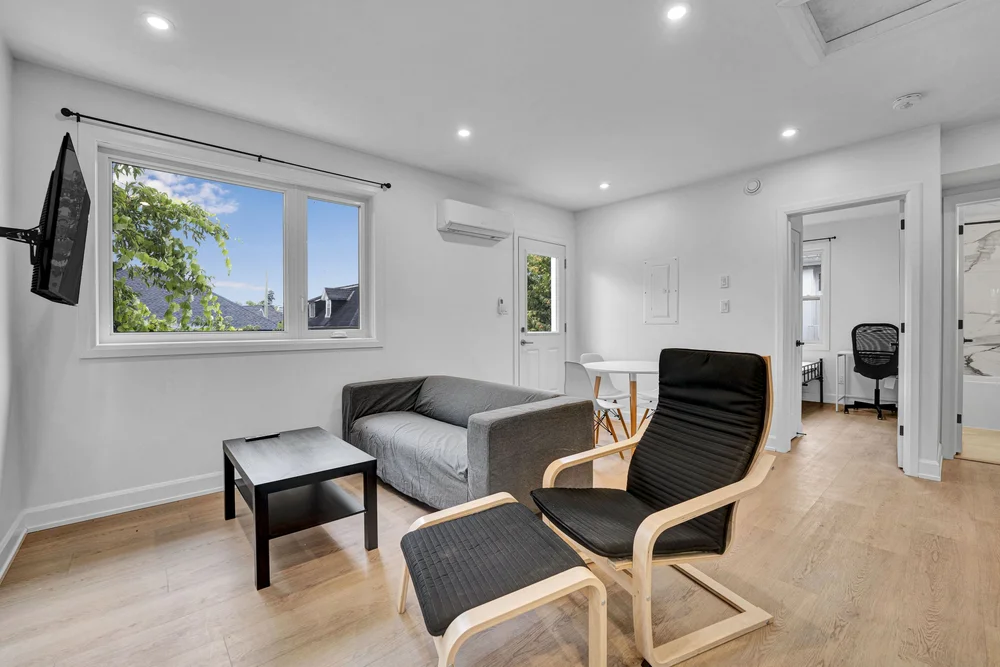
For a portfolio, consistency matters as much as the individual photograph. Create a simple media schedule with one row per unit or layout. Record the suite number, bedroom count, finish package, readiness date, access contact and required deliverables.
Separate the work into three groups: building-wide media, representative layouts and unit-specific differences. Photograph the exterior and common areas as a shared set. Then decide which layouts require their own gallery, floor plan or tour, and which differences need additional photographs.
Label model units clearly
If you use a model suite to illustrate another unit, say so next to the images and tour. Identify meaningful differences such as flooring, appliances, orientation, balcony, floor level or renovations. Avoid combining photographs from several suites into what appears to be one apartment.
A useful caption is: “Model suite shown. Contact the leasing team for the available unit’s layout, finishes and view.” Only use that description when it accurately reflects the material. For virtually staged photographs, label the digital furniture and retain an original image so viewers can compare the empty room.
Create a media library your team can maintain
Use folders such as “Building / Unit or Layout / Capture Date / Photos, Floor Plan, Tour, Video.” Keep the tour link and hosting details with the matching layout. Record whether an image is an actual available suite, a representative model or a virtually staged example.
This avoids a common operational problem: a leasing team finds an attractive image but cannot tell which unit it belongs to. Review the library after renovations, appliance changes or alterations to common areas, and replace media that no longer represents the property.
4. Use real local work to shape your brief
Our 333 Belfort Street project in Embrun combines exterior and common-area photography with property video and 3D-tour examples. It is a useful reference when deciding how to separate the building’s overall presentation from its individual interiors.
The Carlton West gallery at 1655 Carling Avenue provides another Ottawa apartment-property reference. At 39 Goulburn Avenue in Sandy Hill, the gallery includes multiple suites. Compare the kinds of views, rather than assuming every property needs the same image count.
These are examples of our media work, not claims about occupancy, rental increases or leasing speed. For your project, define the information tenants need and the channels your team will use.
5. Match the budget to the scope
For a single property, our current packages provide a starting point. Multi-unit buildings, shared amenities, several locations and recurring work need a confirmed scope and quotation.
- Basic — $300 + tax: up to 40 photos, floor plan, virtual feature sheet, blue sky replacement and custom property page.
- Standard — $500 + tax: adds a virtual tour to the Basic media combination.
- Premium — $700 + tax: includes up to 40 photos, a virtual tour and a video walkthrough OR drone video. Choosing drone video includes drone photos.
- Luxury — $900 + tax: includes unlimited photos, virtual tour, video walkthrough, drone video and drone photos.
All four packages include a floor plan, virtual feature sheet, virtual twilight, blue sky replacement, custom property page and delivery within 24 hours. Additional charges apply above 2,500 sq. ft.; confirm travel and project-specific requirements. Compare the complete package inclusions before booking.
For tours, the current published hosting arrangement is three months included, followed by $15 per month. Confirm the number of tours and the hosting term in a portfolio quote. A reusable model-unit tour may need to remain online longer than a one-time vacancy campaign.
Same-day photography delivery is an additional $60 + tax. Two-hour photography delivery is an additional $100 + tax, subject to approval. These options apply to photography only, including Basic and Standard photos; they do not accelerate the tour, video or other media. Confirm delivery timing separately for custom multi-unit projects.
6. Get every space ready before the appointment
Book after cleaning and planned maintenance are complete. Assign one person to coordinate keys, parking, building access and any common-area arrangements. For occupied units, have the manager arrange appropriate access and privacy preparations before the photographer arrives.
Clear counters and floors, remove personal documents and identifying photographs from view, replace failed bulbs and tidy balconies. Open the rooms included in the scope and confirm that the furniture arrangement will remain consistent throughout photography, filming and scanning.
Send a short priority list in advance: the available suites, the features that need coverage, any spaces to exclude and the launch date. Use our property preparation checklist to help each unit reach the same standard.
7. Check the listing as a prospective tenant would
Before launch, open the complete listing on a phone. Confirm the first image is strong, the rooms follow a sensible sequence and the floor plan is readable. Test the tour link, video and enquiry button. Check that the unit number and description match the media.
- State whether each gallery shows the actual suite or a model.
- Keep availability, rent and inclusions current in the listing copy.
- Describe amenities accurately, including anything shared or optional.
- Give viewers one clear next step: contact the leasing team or request a viewing.
- Check that tour hosting will remain active throughout the campaign.
- Remove or update outdated images when the property changes.
Track enquiries, viewing requests and repeated questions after launch. If several people ask where the laundry is, add a clear photograph or caption. If viewers misunderstand the layout, make the floor plan easier to find. Improve the presentation using the questions your team actually receives.
Rental media: common questions
Do I need to photograph every unit?
Not every unit needs identical coverage, but every listing needs accurate representation. Plan coverage by layout and meaningful differences. Clearly label representative suites and arrange unit-specific photography when finishes, views or configurations differ.
Should I choose a 3D tour or a walkthrough video?
Choose a 3D tour when independent exploration of the layout is the priority. Choose video for a guided introduction or a campaign asset. Photography and a floor plan remain a useful foundation for either option.
Can the same media be reused for future vacancies?
Yes, where the agreed usage permits it and the images still represent the property. Confirm usage rights and hosting arrangements in the quote, keep capture dates on file and refresh the media when material details change.
Do you serve Gatineau and surrounding communities?
We serve Ottawa, Gatineau and nearby communities, including Orléans, Kanata, Stittsville, Barrhaven, Aylmer and Chelsea. Check our service area and provide each address so we can confirm coverage and travel charges.
ONE UNIT OR A WHOLE PORTFOLIO
Make your next rental listing easier to understand.
NVISION 3D brings photography, floor plans, 3D tours, video and drone media together for Ottawa and Gatineau properties. Send your address, unit count, layouts and target date, and we’ll help you plan the right coverage.
Request a rental media quote ↗ Book a shoot
Prefer to speak with us? 819-329-0716 · info@nvision3d.ca
Package and hosting details checked October 23, 2026 against our package comparison and Matterport service page. Confirm the final scope and price when booking.